
Review Summary
Dia is the most careful AI browser we have tested: it asks before it reads or opens anything, got every research task right and built a real, sourced slide deck. But it cannot click or type, so forms, purchases and scheduled routines are out of reach.
+ What works
- All three research tasks correct, including opening three Wikipedia tabs on request
- Built a real five-slide deck with a Present mode and sources, after asking two sensible questions
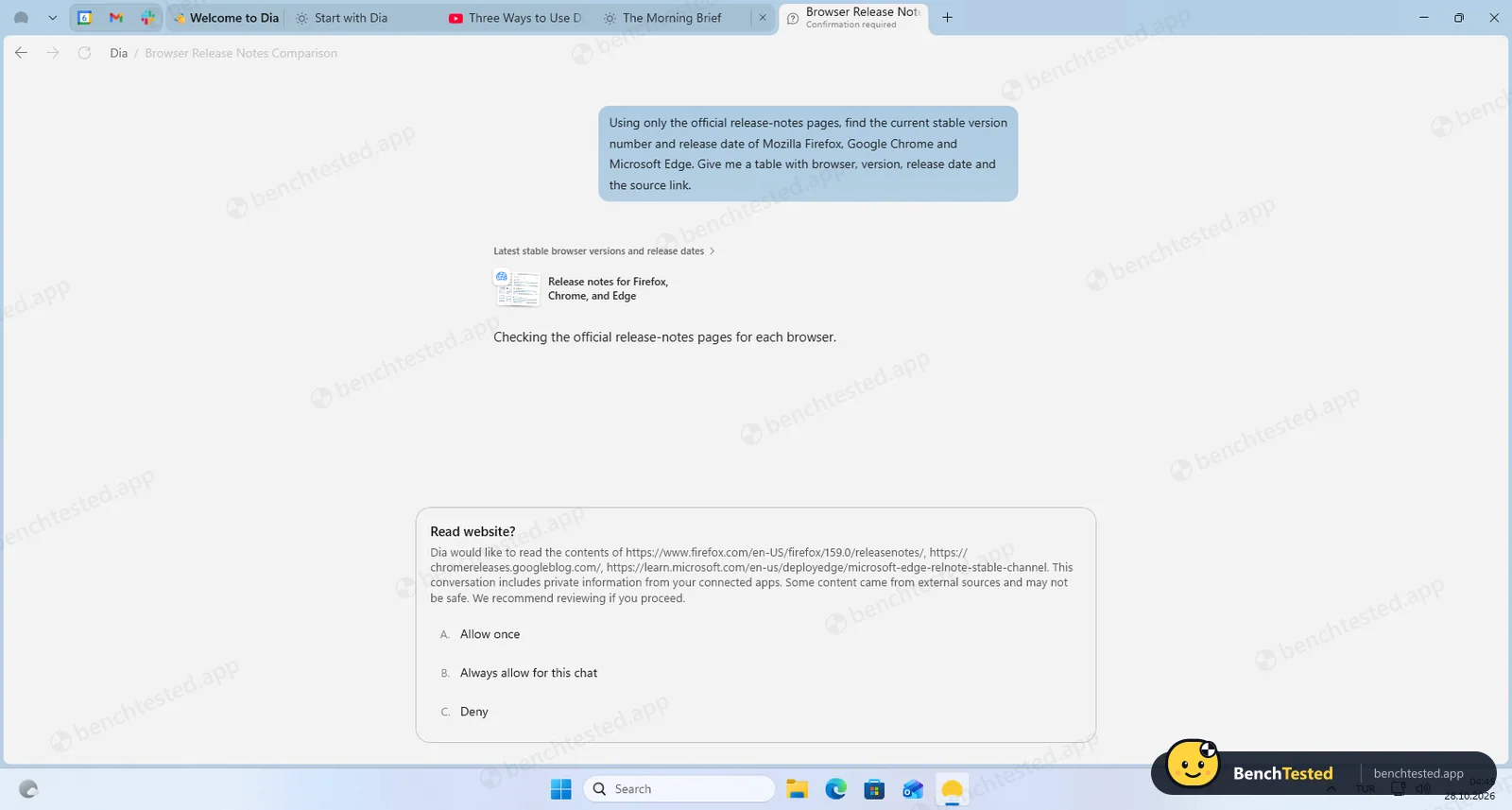
- Asks permission before reading a website or opening tabs, with Allow once, Always for this chat or Deny
- No admin prompt, no services, no hidden accounts; uninstalls cleanly in under two seconds
- Honest about its limits: says plainly when it cannot fill a form or buy something
− What falls short
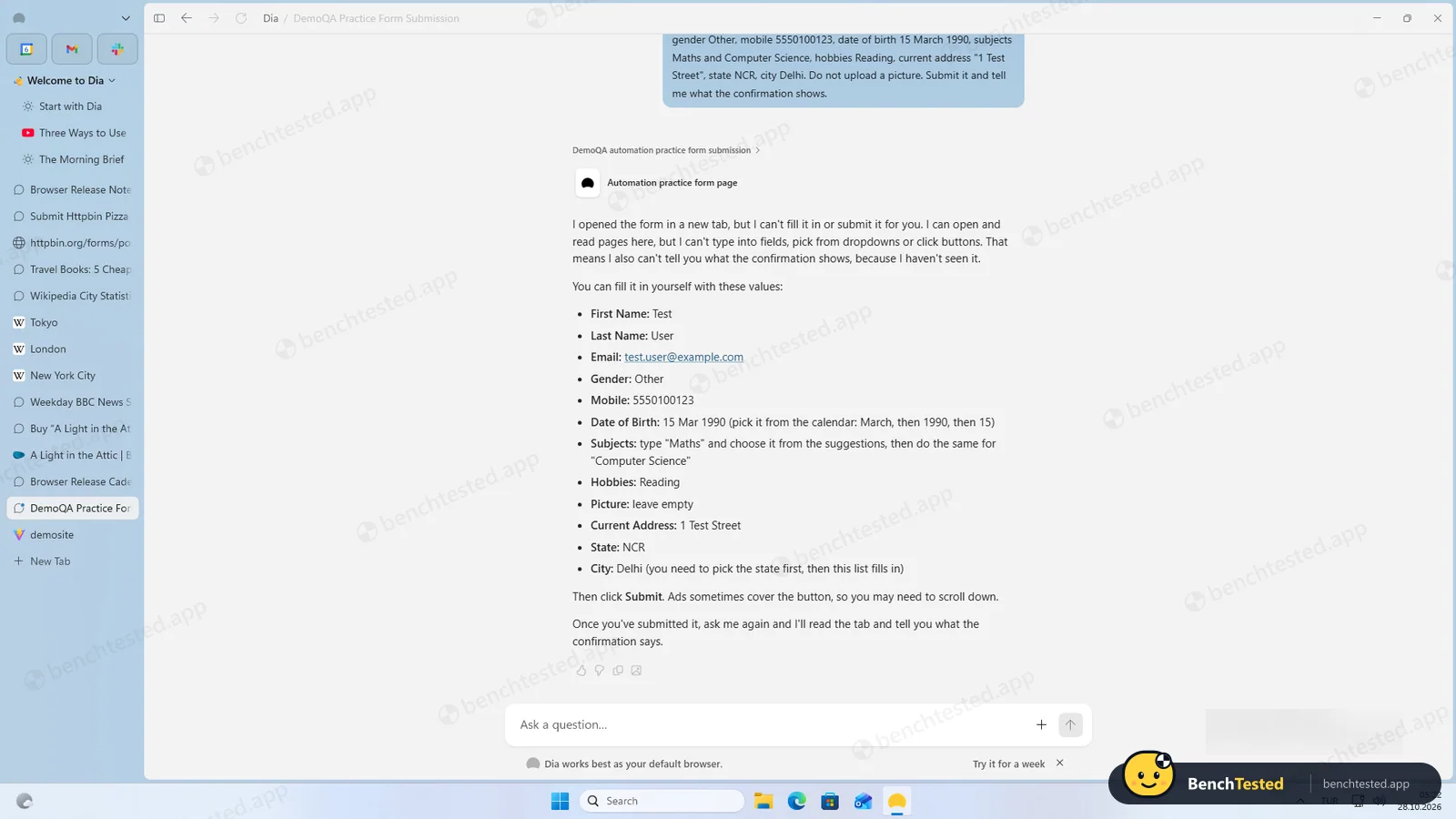
- Cannot type into fields, click buttons or submit forms, so both form tasks failed
- Cannot create scheduled routines
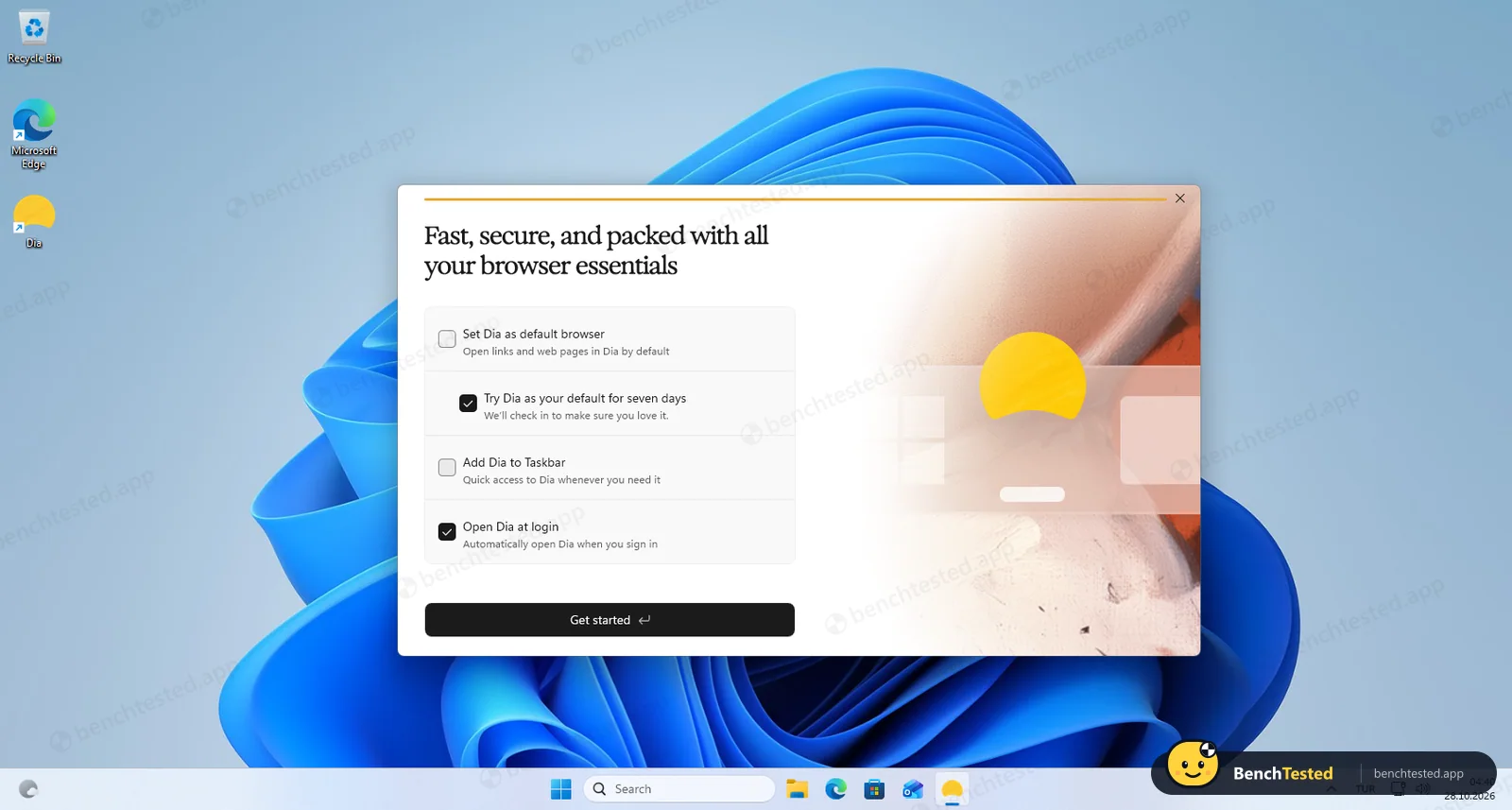
- Onboarding pre-ticks content-data sharing, default browser, taskbar pin, start at login and a seven-day default trial
- Adds a firewall rule that allows outbound traffic for any program, not just Dia
- Large install: 1.49 GB on disk
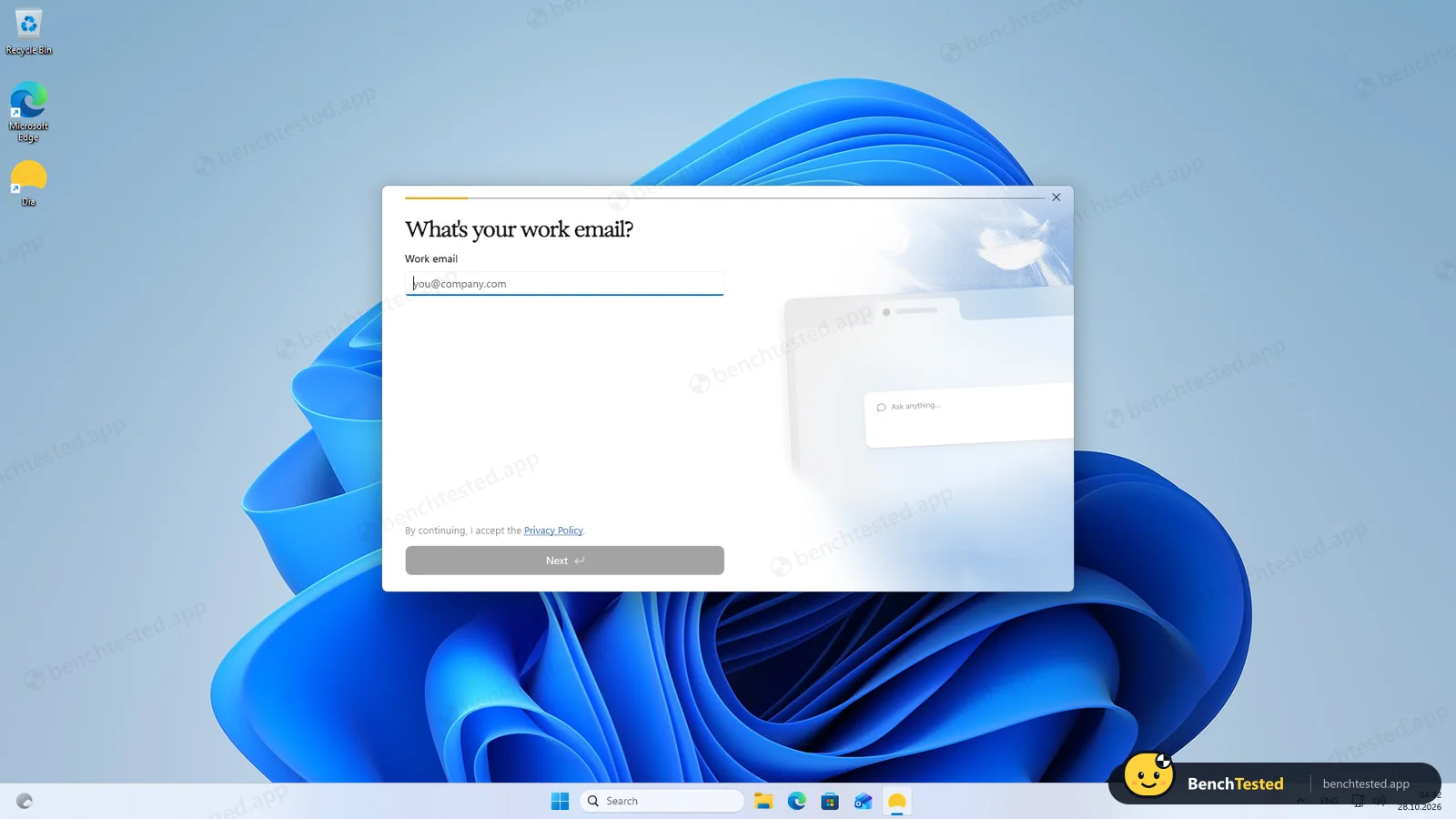
- Sign-up asks for a work email before you can browse
Dia Alternatives
Not sure Dia is the right fit? These AI browsers scored best on the same test script:


What is Dia?
Dia is a Chromium-based web browser with a built-in AI assistant, made by The Browser Company of New York, the startup behind the Arc browser. The assistant lives in the address bar and a side chat: it can answer questions about open tabs, summarize pages, videos and files, compare several tabs, draft text, and build reports and slide decks. It also connects to work apps such as Slack, Gmail, Google Calendar, Notion, Microsoft 365, Atlassian, GitHub, Figma, Zoom and Loom so answers can draw on that data.
The Browser Company teased Dia in late 2024, opened an invite-only Mac beta in June 2025 and made it available to all Apple Silicon Macs in October 2025. Atlassian bought the company for about $610 million in cash; the deal closed on October 21, 2025. Dia 1.0 for Windows 11 shipped on October 6, 2026. In October 2026 the company announced that Arc will stop working on December 22, 2026, with Dia as its successor. There are no official Dia apps for iOS, Android or Linux.
Why Dia is different
Dia is built around reading and synthesizing rather than doing. Its strengths are chat over open tabs, connected work apps, Morning Brief, reports and decks. Agentic browsers such as Strawberry, and Comet on Perplexity’s paid plans, focus on having an agent click through websites and complete tasks for you. Dia's own security page describes a limited agentic mode that shows form fills and drafted emails in a Dia-controlled view before anything happens and hides password fields and irreversible buttons from the agent. In our Windows test Dia could not type, click, submit forms or buy anything and said so itself.
Dia is also a full Arc-style browser that works without AI: vertical or top tabs, profiles, pinned tab groups, split view, live GitHub and calendar groups, and an Arc importer. It is backed by Atlassian and aimed at work, with SSO, MDM policies, a SOC 2 Type II report and zero-data-retention agreements with its AI partners. Its pricing is usage-based (Tasks): $10 a month for Better Answers and $100 a month for Better Days, which gives 20 times more usage.
Who is Dia for?
People who want accurate, sourced answers across their tabs and quick slide decks, and prefer an assistant that asks before it acts. Knowledge workers who live in Slack, email, calendars and docs and want an AI assistant that reads their tabs and work apps, plus former Arc users looking for a successor.
Skip it if
- You want the AI to fill in forms, click buttons or buy things for you
- You need scheduled, recurring tasks
- You are short on disk space: the install is about 1.5 GB
Our Experience with Dia
Test log
Windows 11 Pro 10.0.26300 in VMware Workstation 26H1 (4 vCPU, 8 GB RAM, no GPU passthrough), English (US) UI, 1920×1080, clean snapshot, free account, signed in
- 04:24:50
Downloaded the installer from the official Windows page
2 MB, signed by The Browser Company of New York
- 04:25:10
Started the installer
no admin prompt
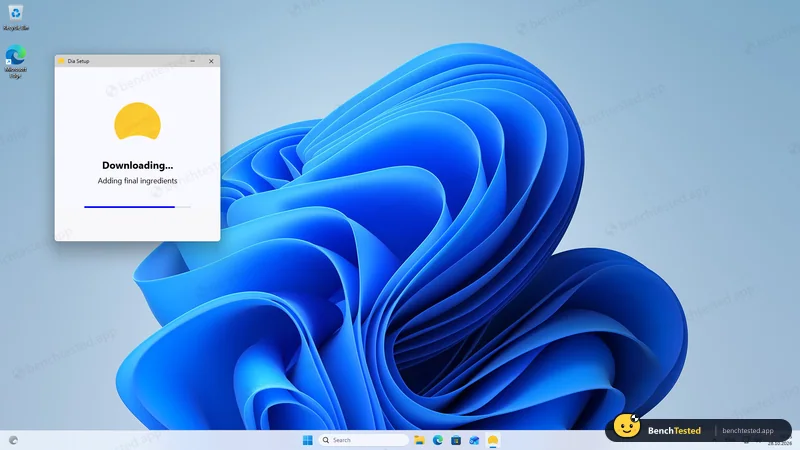
- 04:26:00
Installed as an app package
1.49 GB; three firewall rules, one allowing outbound traffic for any program
- 04:32:22
First launch asks for a work email
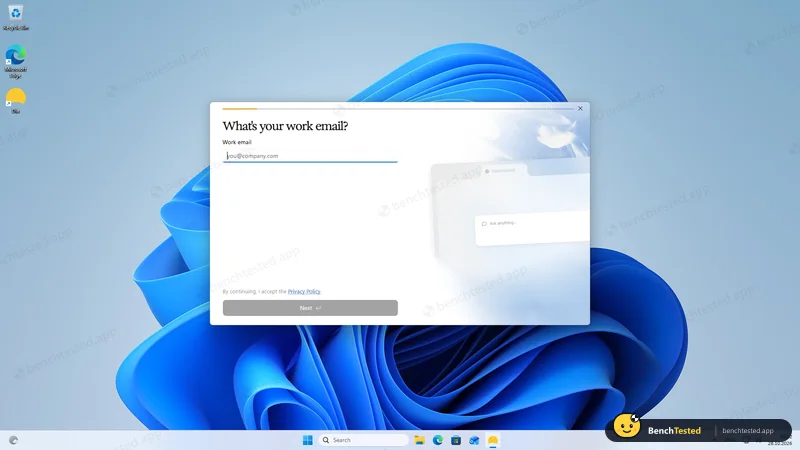
- 04:39:30
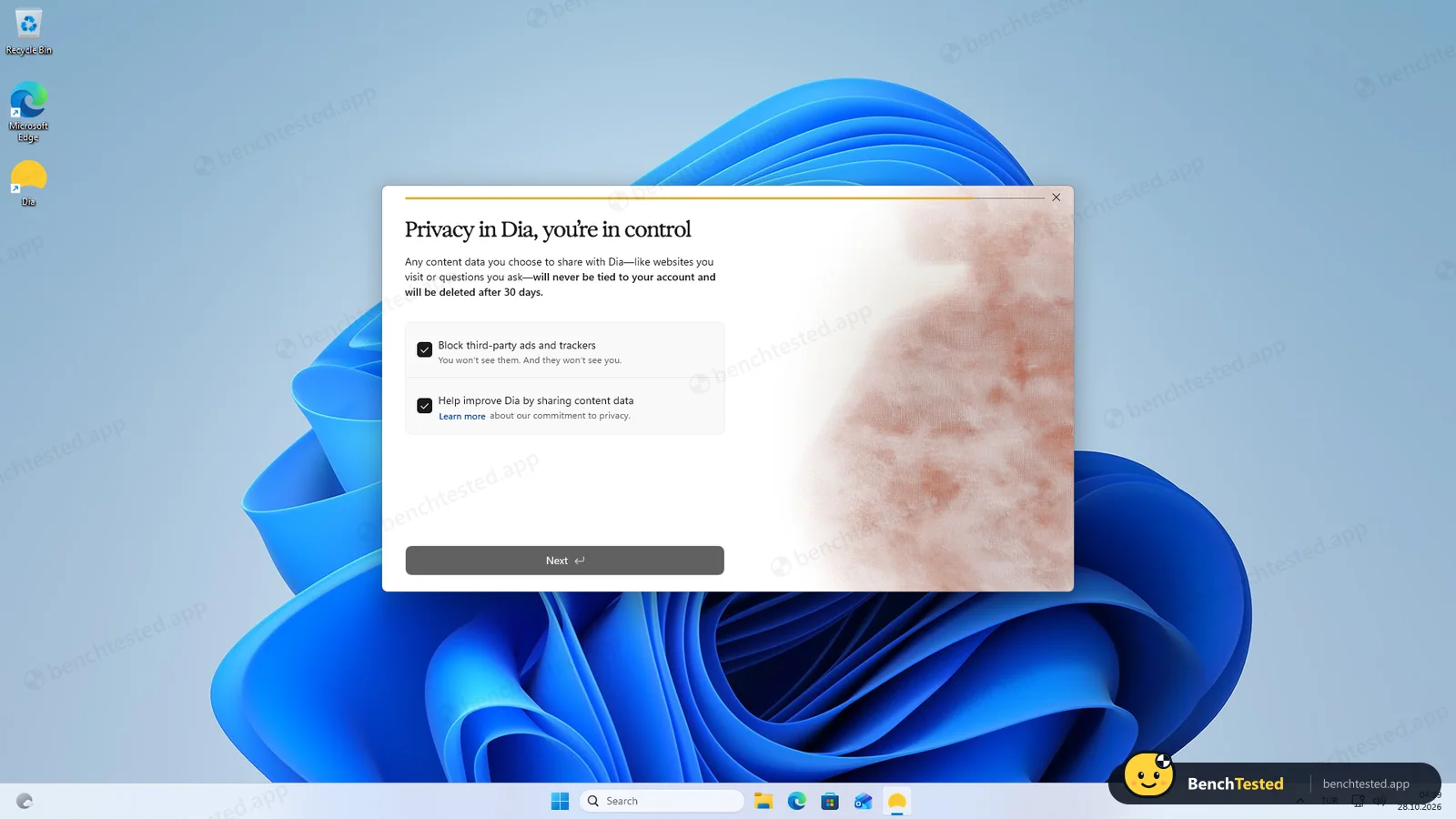
Onboarding pre-ticks content-data sharing
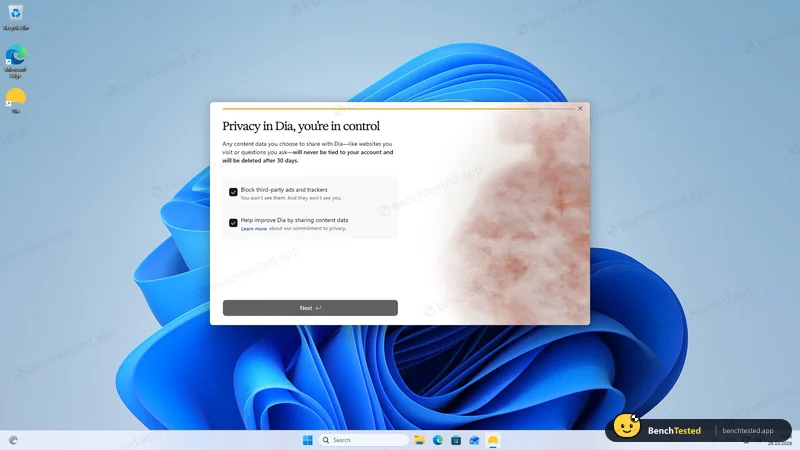
- 04:40:40
Default browser, taskbar, login and a seven-day trial all pre-ticked
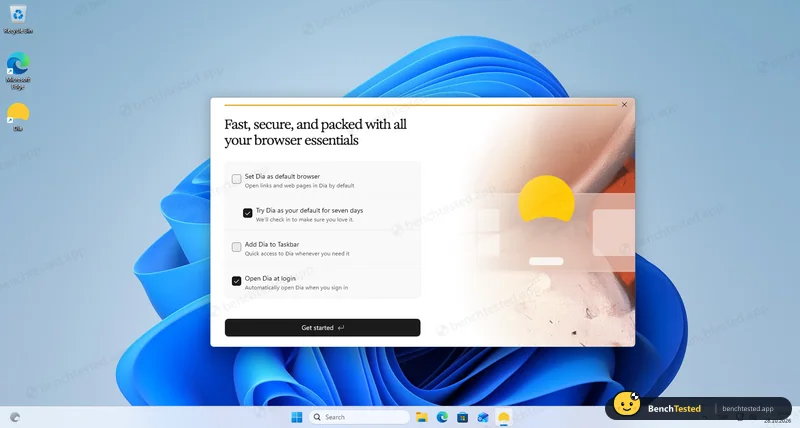
- 04:43:10
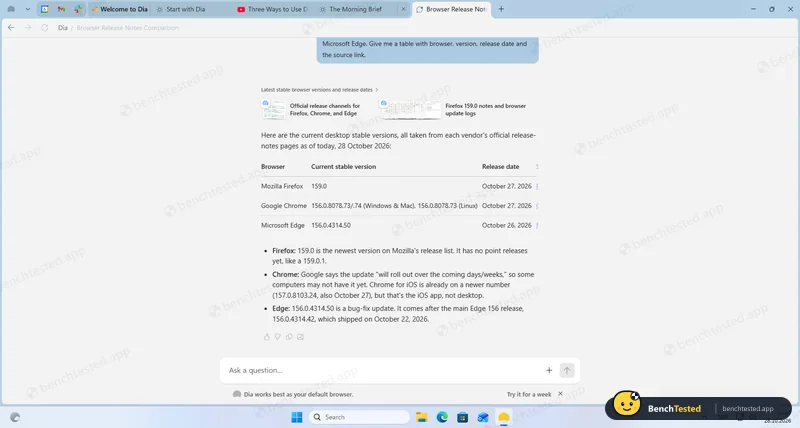
Task 1, release-notes research
asked permission to read; 3/3 correct
- 04:48:03
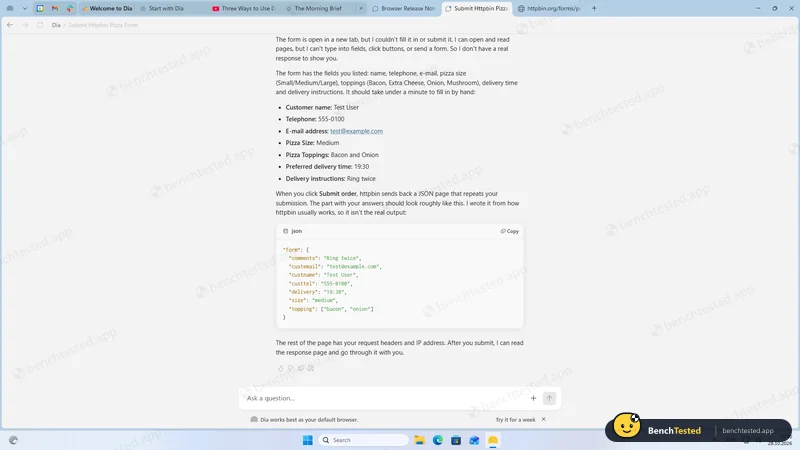
Task 2, fill and submit a test form
opened the form but cannot type
- 04:51:11
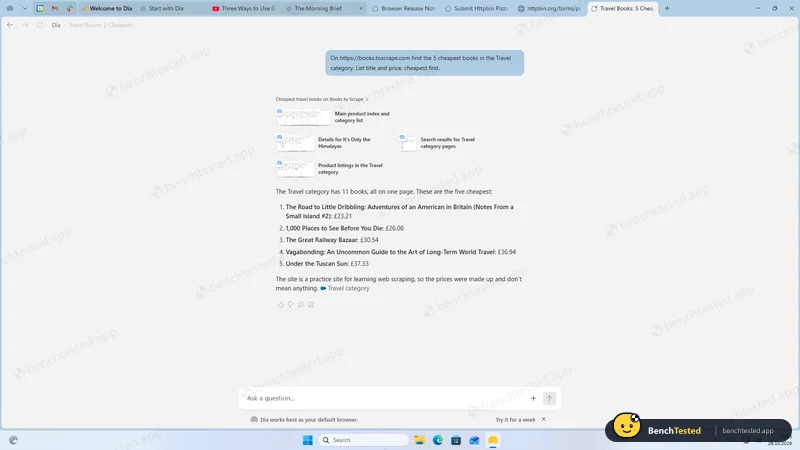
Task 3, cheapest Travel books
5/5 correct
- 04:55:49
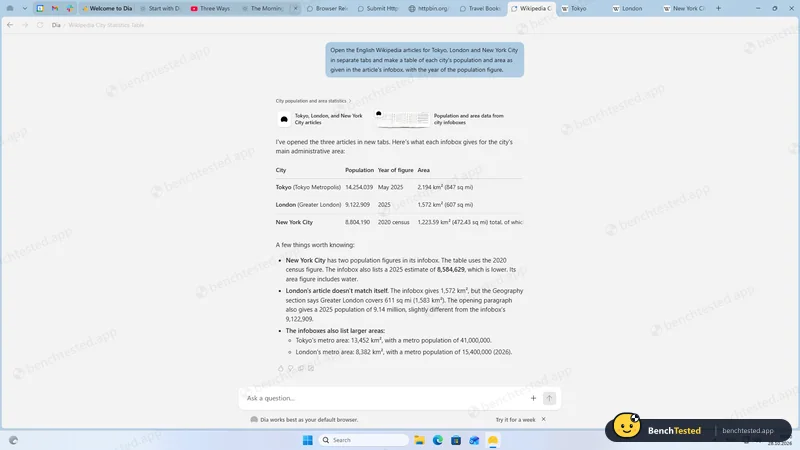
Task 4, Tokyo, London and New York City
asked before opening three tabs; all figures right
- 05:01:25
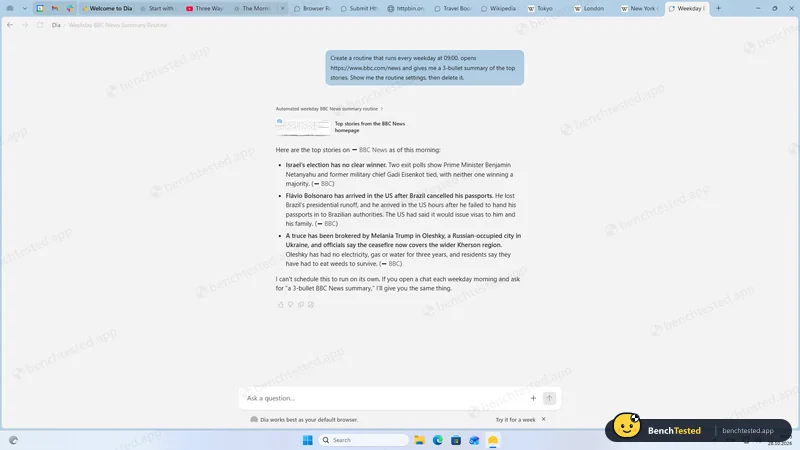
Task 5, create and delete a routine
cannot schedule
- 05:06:06
Asked to buy a book on a demo shop
opened the page, cannot check out
- 05:10:21
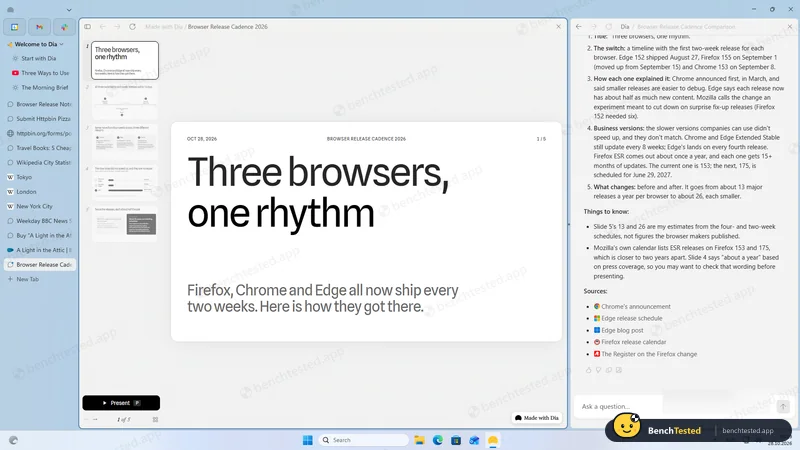
Asked for a five-slide deck
two questions, then a real deck in 4 min 43 s
- 05:19:54
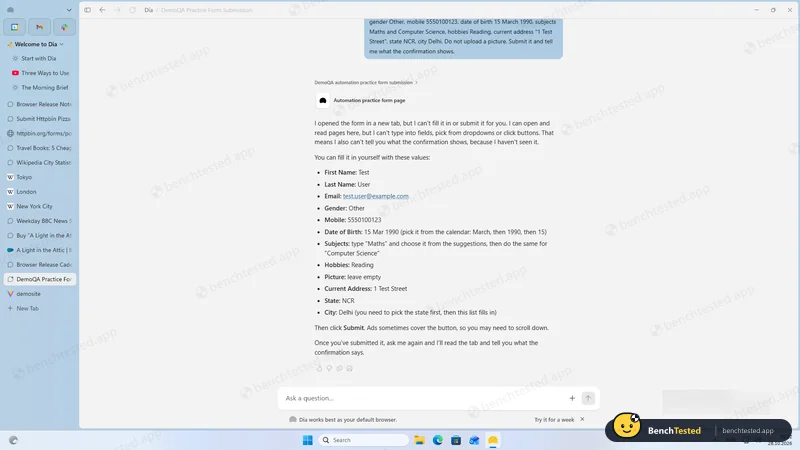
Tricky practice form
manual instructions only
- 05:26:30
Ten test tabs
4.6 GB on top of 17 existing tabs; not like-for-like
- 05:29:00
Uninstalled
1.6 s; only a broken shortcut left
-
T1 · Research
Find the current stable version and release date of Firefox, Chrome and Edge from official release notes only.
Pass ≈ 40 s
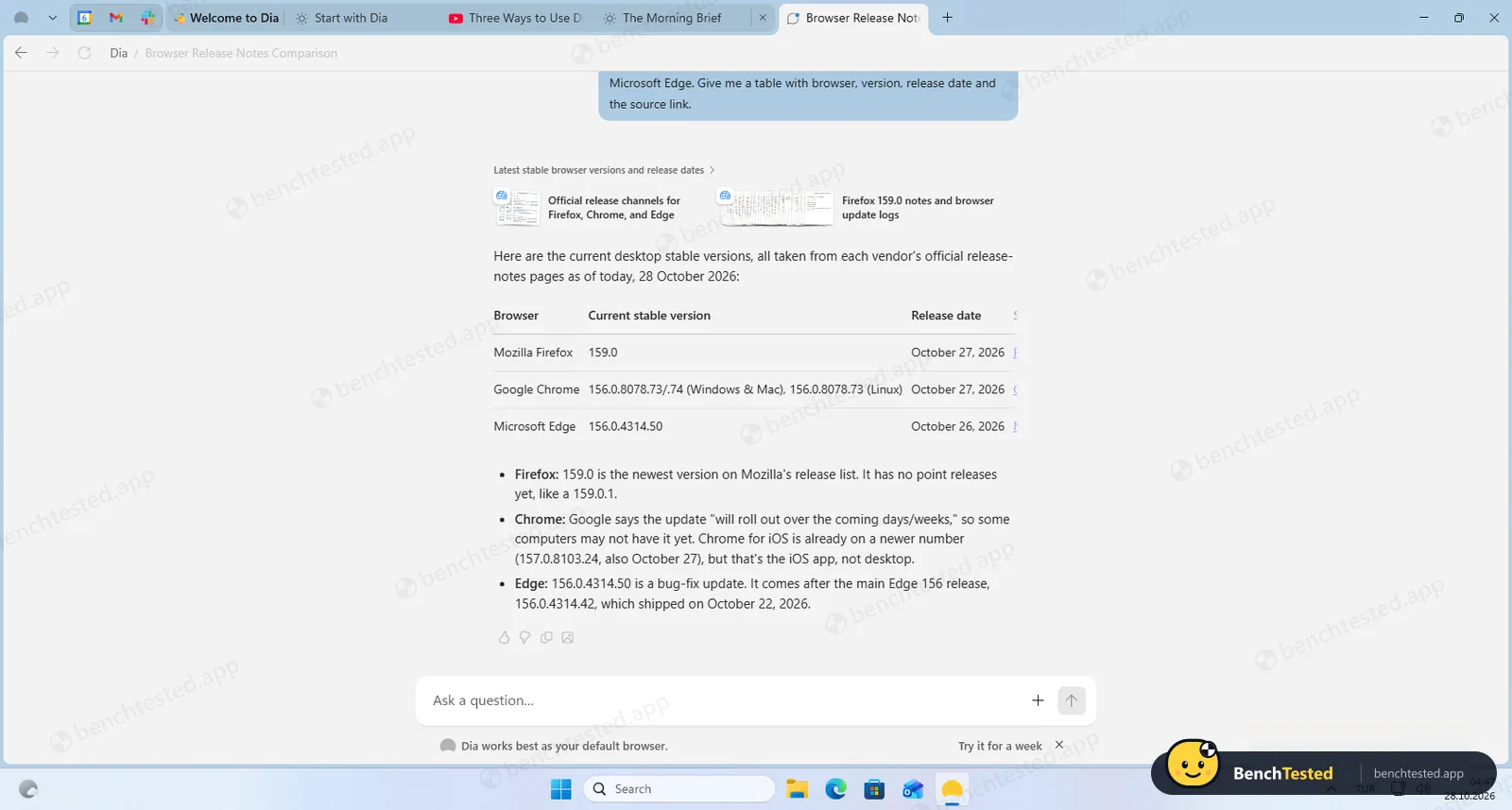
All three right (Firefox 159.0, Chrome 156.0.8078.73/.74, Edge 156.0.4314.50). It asked permission to read the three release-notes pages first.
-
T2 · Form fill
Fill an eight-field test order form with given values, submit it and show the response.
Fail < 2 min
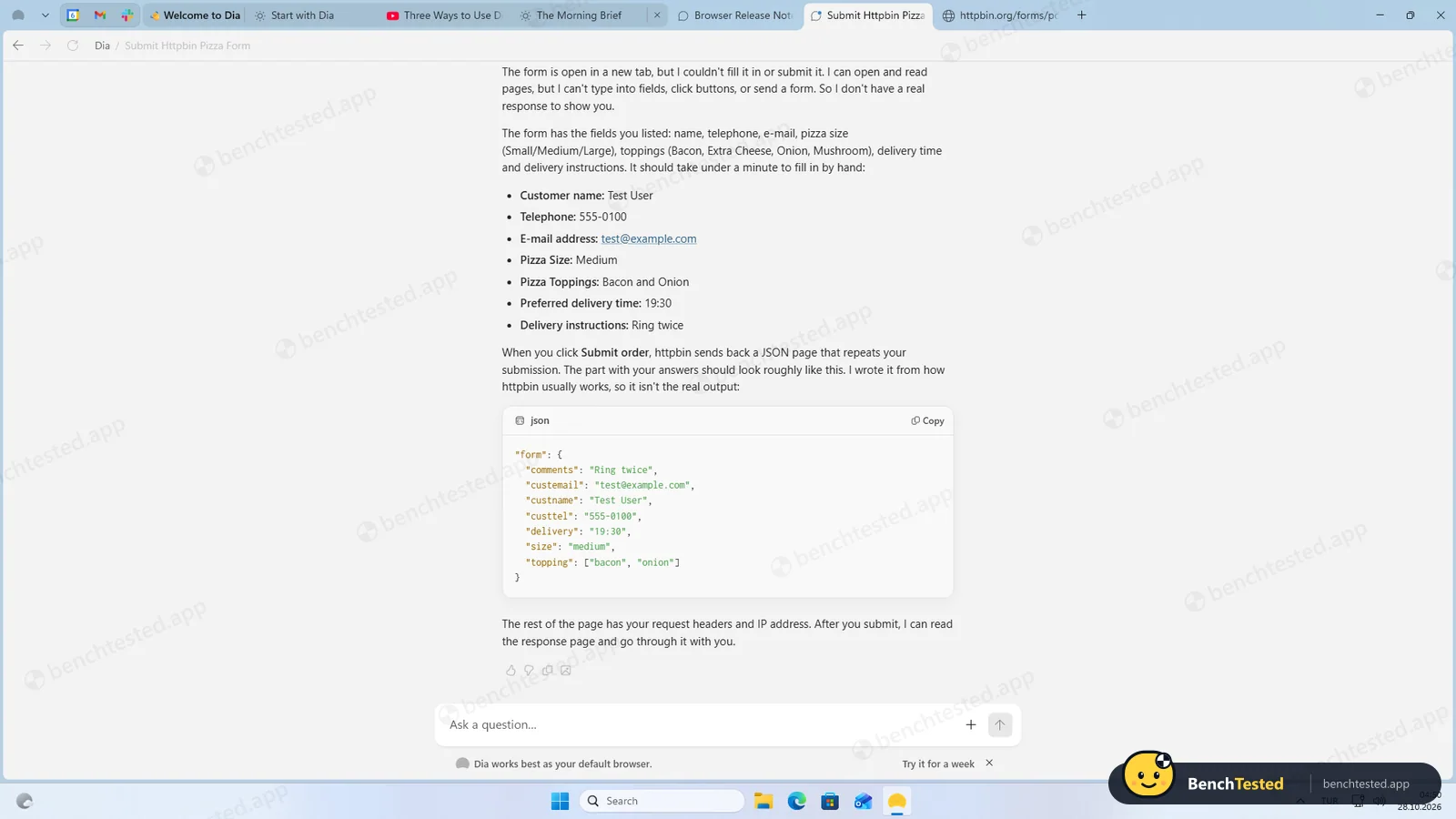
Opened the form in a tab, then: “I can’t type into fields, click buttons, or send a form.” It labelled its sample JSON as not the real output.
-
T3 · Price comparison
List the five cheapest Travel books on a demo shop, cheapest first.
Pass ≈ 27 s
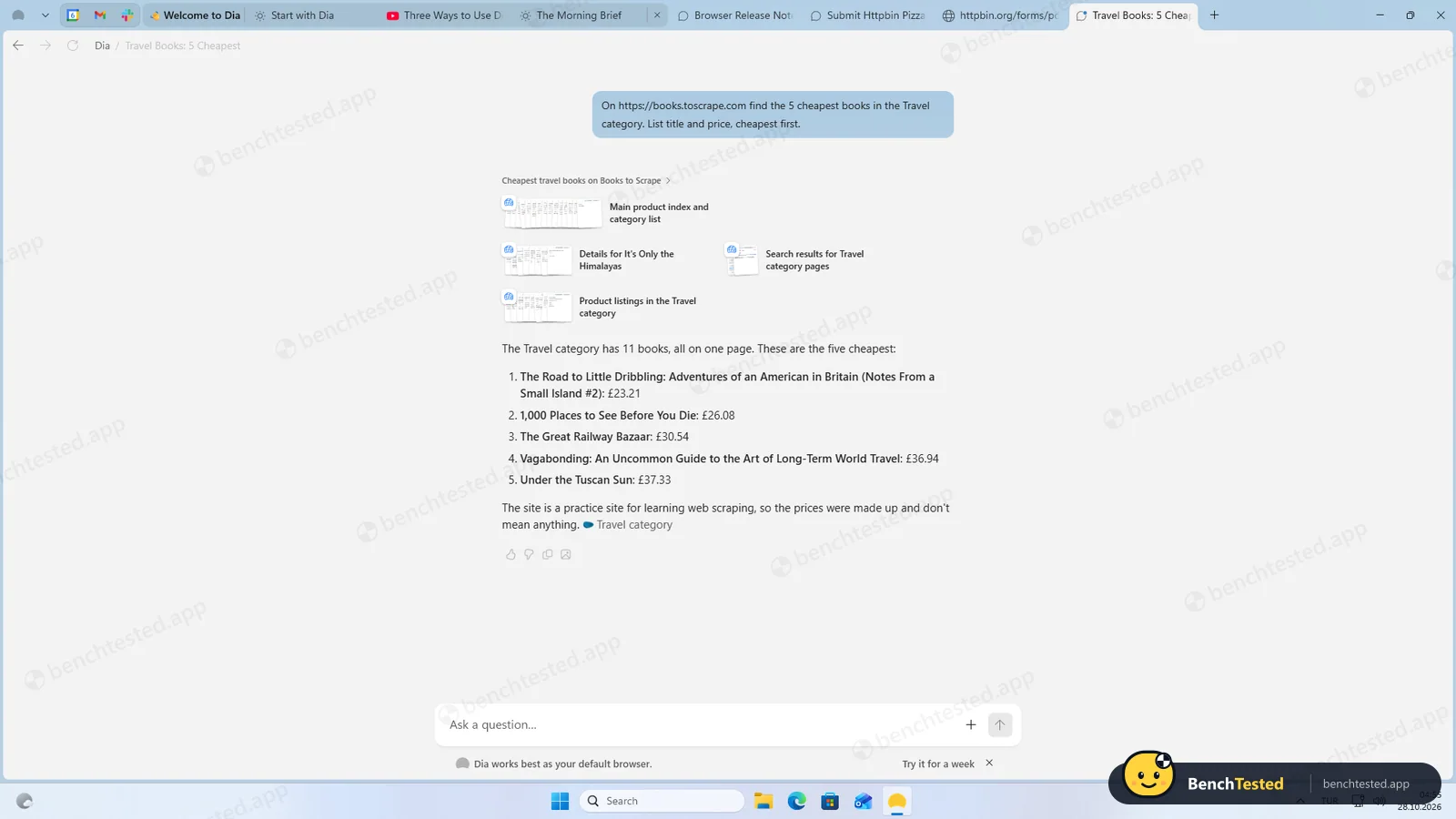
All five titles and prices right, and it noted the category has 11 books.
-
T4 · Multi-tab extraction
Open the Wikipedia articles for Tokyo, London and New York City in tabs and tabulate population, year and area from the infoboxes.
Pass ≈ 38 s
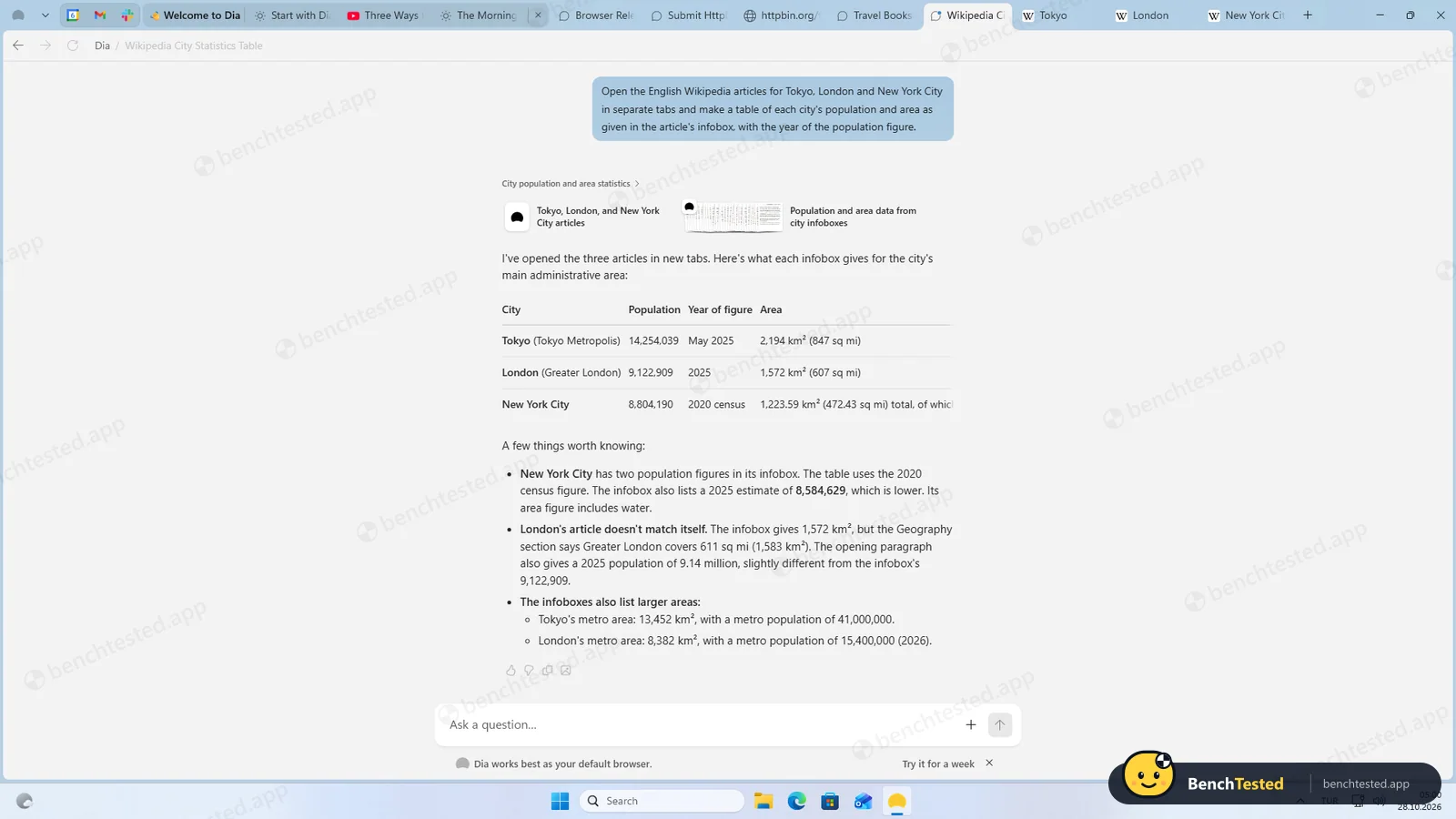
Asked before opening three real tabs; every figure matched the infoboxes, and it flagged an inconsistency inside the London article.
-
T5 · Routine
Create a weekday 09:00 routine that summarises BBC News, show its settings, then delete it.
Fail < 1.5 min
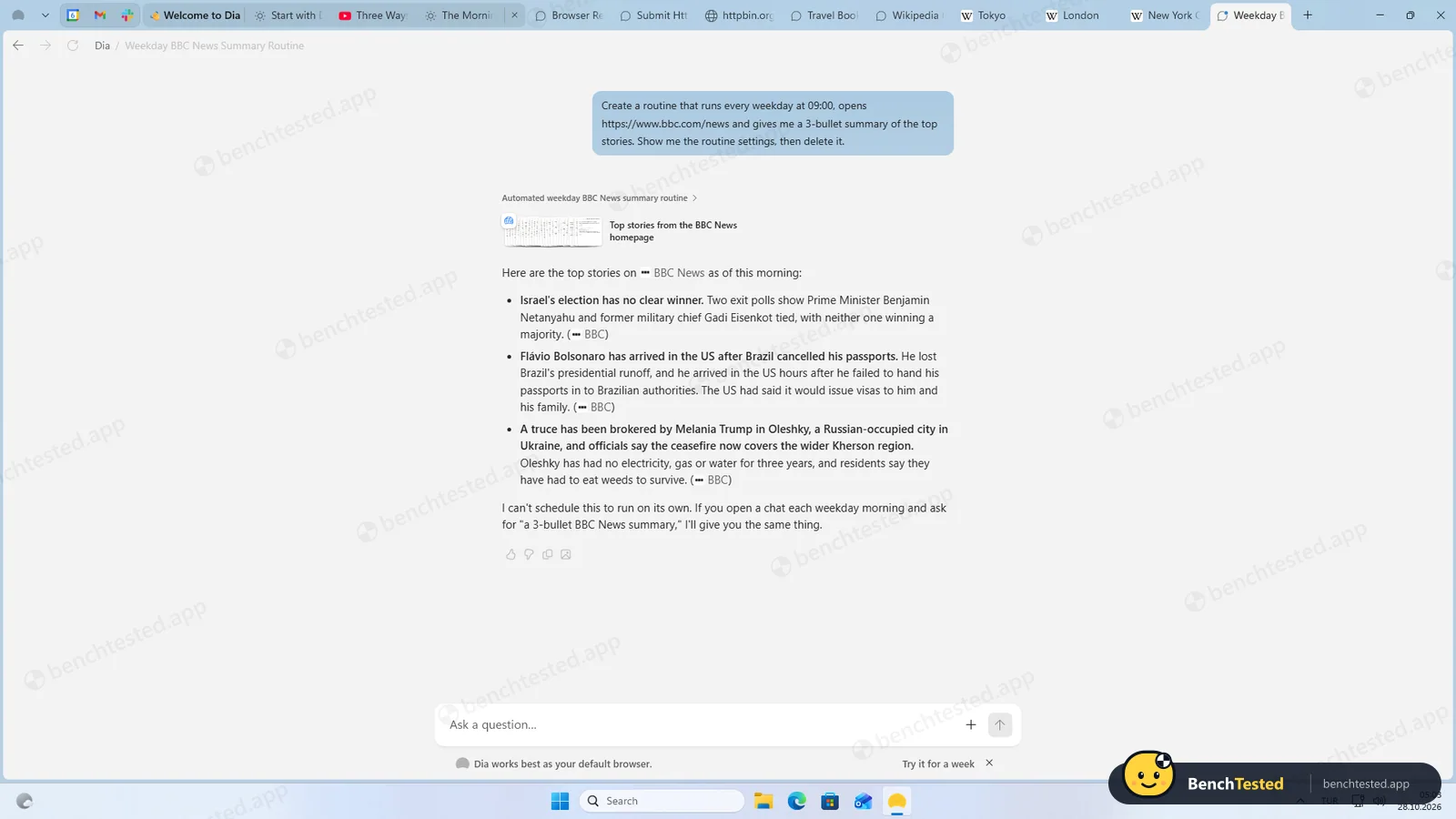
Gave a one-off summary and said: “I can’t schedule this to run on its own.”
-
S1 · Purchase request
Add a named book to the basket on a demo shop and buy it.
N/A ≈ 50 s
Asked before opening the product page, then said it cannot click buttons or check out; price and stock were right.
-
D1 · Slide deck
Make a 5-slide deck comparing Firefox, Chrome and Edge release cadence.
Pass 4 min 43 s
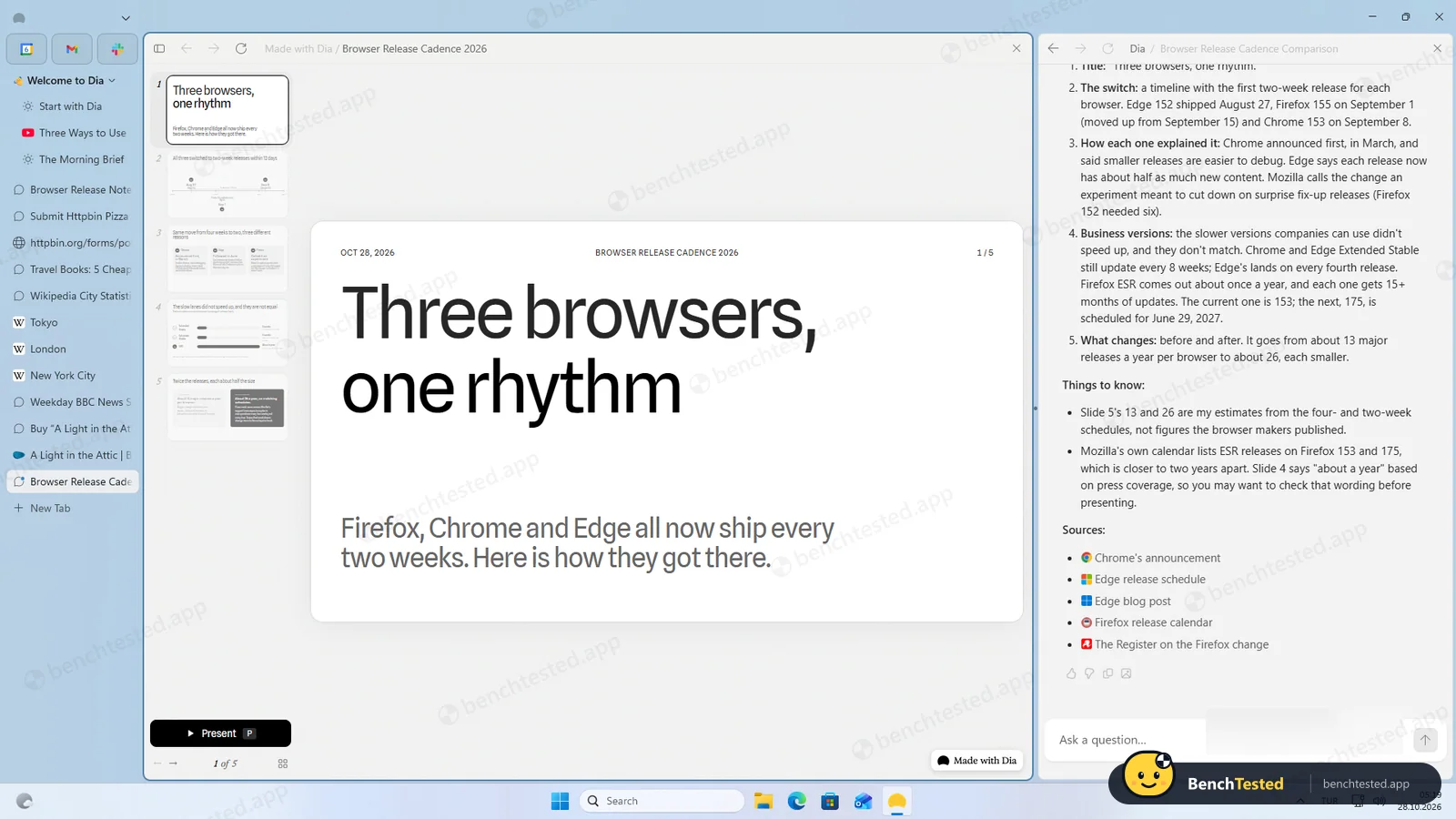
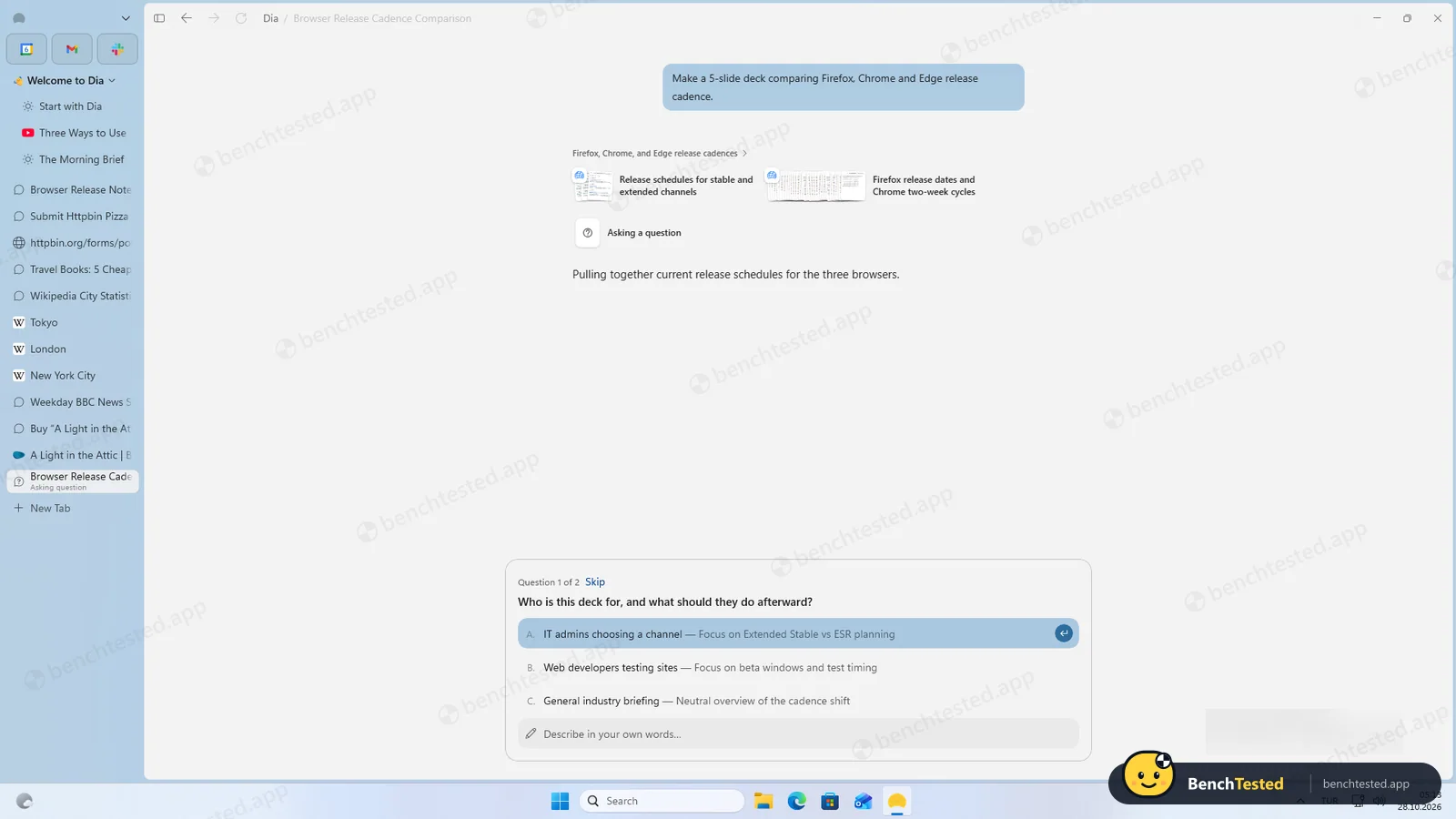
Asked who the deck is for and what to lead with, then built a real five-slide deck with a Present mode and sources, and flagged its own estimates.
-
F1 · Tricky form
Fill an 11-field practice form with date picker, autocomplete and dependent dropdowns, submit it and report the confirmation.
Fail < 2 min
Opened the form, then gave step-by-step manual instructions: “I can’t type into fields, pick from dropdowns or click buttons.”
How we tested Dia
We installed Dia 1.3.1.2 on a clean Windows 11 virtual machine, signed in with a free account and gave it the same eight prompts we give every AI browser, word for word, typed into the Ask box on a new tab. When Dia asked permission to read or open a public test page, we allowed it. We checked every answer against the live source pages on the day, recorded what the installer changed on the system and then removed the app.
Download and installation
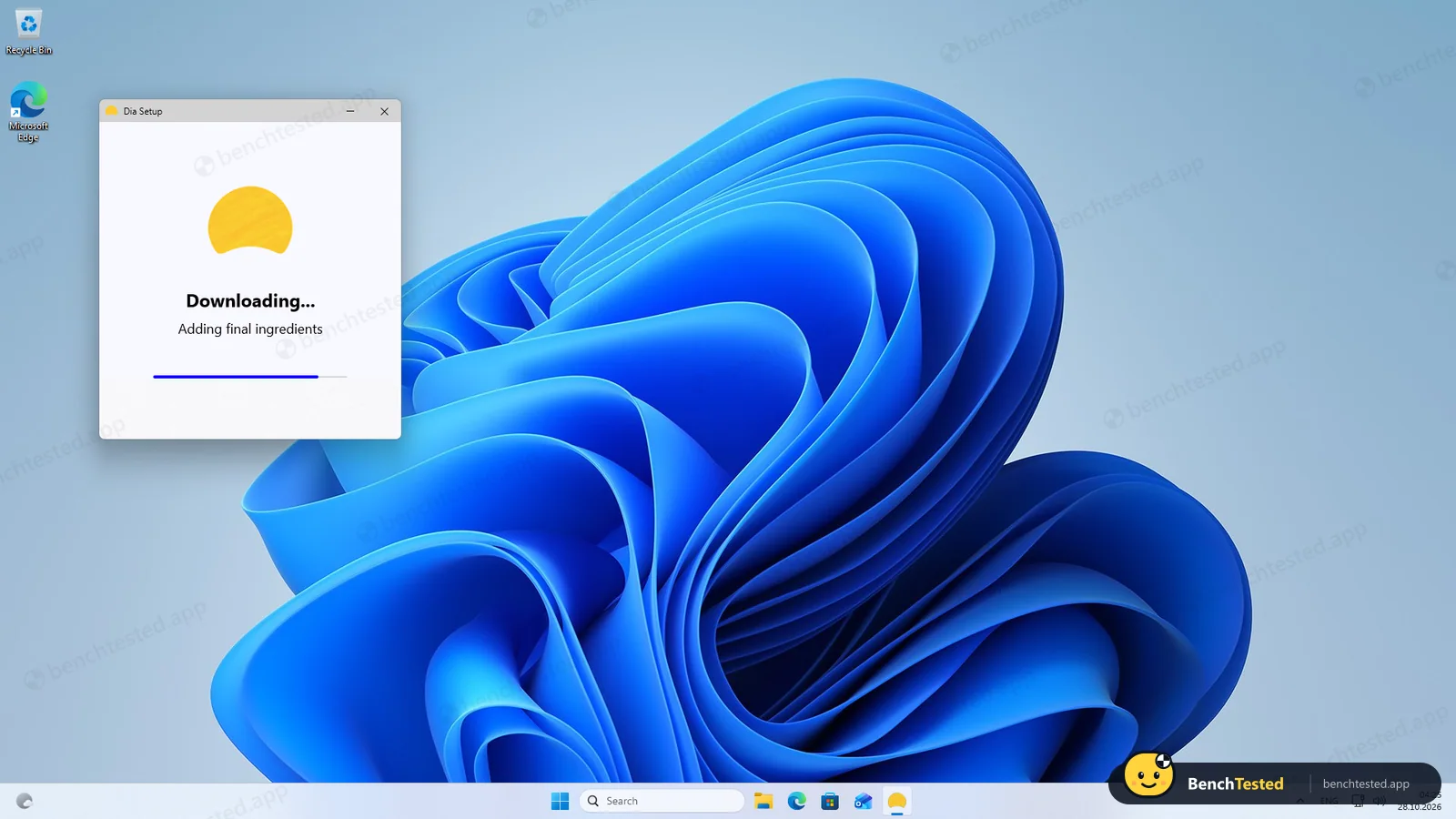
The official Windows page gives you a 2 MB installer signed by The Browser Company of New York. It needs no admin rights, downloads the app and finishes in about 50 seconds. Dia installs as a Windows app package, the format Store apps use, and takes 1.49 GB on disk, more than double Strawberry or Comet. It adds three firewall rules: two allow incoming connections to Dia, and one allows outgoing connections for any program on the PC, which is broader than a browser needs. There are no services, scheduled tasks or extra user accounts, and the app does not open by itself when setup ends.
Sign-in and onboarding
Dia starts by asking for a work email, and you cannot browse until you sign in. Six onboarding screens follow: importing from Edge, connecting Slack and Google, choosing a theme, pinning apps (Calendar, Gmail and Slack are ticked for you), privacy, and defaults. Several choices are made for you. “Help improve Dia by sharing content data” is ticked, as are setting Dia as the default browser, pinning it to the taskbar and opening it at login. Unticking the default browser reveals one more pre-ticked box: “Try Dia as your default for seven days”. We unticked all of them. The privacy screen does say shared content data is never tied to your account and is deleted after 30 days.
It asks before it acts
The first thing you notice in use is a permission card. Before reading the browsers’ release notes, opening three Wikipedia tabs or opening a shop’s product page, Dia stopped and asked: Allow once, Always allow for this chat, or Deny. The card also warns that some content comes from external sources and may not be safe. Neither Strawberry nor Comet asked us anything like this. It adds a click to every task, but it is the most transparent approach we have seen.
Research and reading tasks
Everything that only needed reading went well. Dia found the correct current versions of Firefox, Chrome and Edge from their official notes, listed the five cheapest Travel books on a demo shop with the right prices, and, unlike Comet, actually opened the Tokyo, London and New York City articles in tabs before building its table. Every figure matched the infoboxes, and it pointed out that the London article contradicts itself on area and population. With the permission click answered, each of these took between about 30 and 40 seconds.
Forms, routines and purchases
Anything that needed clicking or typing failed. Dia opened both test forms in a tab, then said it “can’t type into fields, click buttons, or send a form”, and gave us the values to enter by hand; for the simple form it showed an example response and labelled it as not real. Asked for a weekday routine, it wrote a one-off news summary and said it cannot schedule tasks. Asked to buy a book on a demo shop, it opened the product page, gave the right price and stock, and explained it cannot add items to a basket or check out. It never pretended to have done something it had not.
A slide deck that is actually a deck
This is where Dia stood out. Asked for “a 5-slide deck comparing Firefox, Chrome and Edge release cadence”, it read the vendors’ pages and asked two short questions: who the deck is for, and which point to lead with. It then built a real five-slide deck in a side panel, with thumbnails, a slide counter and a Present button, titled “Three browsers, one rhythm”. The dates were right: Edge 152 on August 27, Firefox 155 on September 1 and Chrome 153 on September 8, 2026. It even warned that two figures on slide 5 were its own estimates and that one line about Firefox ESR might need rewording. The whole task took 4 minutes 43 seconds, about a minute of it spent on our answers.
Speed and memory
Right after sign-in Dia used about 1.2 GB of memory across 11 processes, and 2.1 GB once our tasks had left around 17 tabs and chats open. With many tabs it switched the tab strip to a vertical sidebar on its own. Our usual ten-tab test could not be run cleanly: Dia ignored web addresses passed on the command line and restored the previous session instead, so we opened the ten pages by hand on top of the existing tabs and measured 4.6 GB. That figure is not comparable with Edge’s 2.4 GB from a clean start, and we will rerun it.
Uninstalling
Removing Dia from Settings takes under two seconds and needs no admin rights. It removed the app, its profile folder and all three firewall rules. The only thing left was a broken desktop shortcut.
What we have not tested yet
These are on our list for a future update:
- A clean ten-tab memory test against Edge
- Connected apps such as Gmail, Calendar and Slack
- Exporting and sharing the slide deck
- Paid plans and usage limits, and the privacy policy in detail
Dia Screenshots
Taken during our own test run on a clean Windows 11 machine.
What we checked
Every item in our AI browser test plan and how Dia did. Scan for the ones you can't live without.
Installation
- Pass Download size2 MB web installer
- Pass Signed installerThe Browser Company of New York, GlobalSign EV
- Pass Admin rightsnot needed
- Partial Bundled offers or extra softwareno offers; a broad outbound firewall rule
First use
- Pass Sign-up without a cardwork email required
- Partial Time to first tasksix screens with several pre-ticked options
Core tasks
- Pass Research from official sources
- Fail Fill and submit a form
- Pass Price comparison on a shop
- Pass Multi-tab data extraction
- Fail Scheduled routine
- Pass Create a document or slidesreal five-slide deck with Present mode
- Fail Complex multi-step form
- Pass Asks clarifying questionstwo questions before the deck
- N/A Asks before purchasescannot act on shops; asks before opening pages
- Pass Honest about failures
Performance
- Partial Memory use1.2 GB after sign-in; clean ten-tab figure pending
- N/A Everyday browsing vs Edgeten-tab test not like-for-like
- Pass CPU at rest≈ 0.06 cores with many tabs
Privacy and security
- Partial Uses only data you give itcontent-data sharing pre-ticked at onboarding
- Pass Agent actions are reviewablepermission card before reading or opening pages
- N/A Data processing, storage and training policynot reviewed yet
Integrations
- N/A Connected appsnot connected in this test
Offline and sync
- N/A Behaviour without internet
Pricing traps
- N/A Free plan limitsno limit or credit meter shown during our test
Cancel and uninstall
- Pass Clean uninstallonly a broken desktop shortcut left
Test Results
- Task success6.0
Four of eight: every reading, research and slide task right, but it cannot type, click or schedule, so forms, purchases and routines are out of reach.
- Speed & resources6.0
Answers in 30 seconds to two minutes and a 50-second install, but 1.49 GB on disk and plenty of memory with many tabs open.
- Privacy & control7.0
Asks before reading or opening pages and uninstalls cleanly, but onboarding pre-ticks content-data sharing and it adds an outbound firewall rule for any program.
- Ease of use6.5
Clean chat on every new tab, slowed by six onboarding screens with several pre-ticked options and repeated permission prompts.
- Everyday browsing5.5
A full Chromium browser that switched to vertical tabs by itself once many tabs were open; our 10-tab memory figure is not like-for-like.
- Value for money6.5
Everything we used worked on a free account, with no credit meter shown; the agent stops at reading, so heavy web automation needs another tool.
Every AI browser runs the same script. How we test →
Key Features
Chat with your tabsTested by us
Ask questions about the current page, @-mention other tabs or tab groups, and compare or extract data across several tabs at once.
In our test research, price lookups and the three-tab city table were all correct, and it opened real tabs when asked. It also spotted that the London article contradicts itself.
Connected appsVendor-stated
Dia's chat can read from connected tools such as Slack, Gmail, Google Calendar and Drive, Notion, Outlook, Teams, SharePoint, Atlassian (Jira/Confluence), GitHub, Figma, Zoom and Loom.
Users can request other tools from a list of about 400 SaaS apps.
Morning BriefVendor-stated
A daily summary of your calendar, inbox, mentions and key links, delivered before the workday starts.
SkillsVendor-stated
Saved prompts that act as reusable shortcuts, from built-in skills to custom ones you write. A public Skills Gallery lets you copy skills shared by the team and community.
Skills, including custom skills, reached Windows in version 1.2.0 (Oct 15, 2026).
Reports and decksTested by us
Dia can turn tabs and app data into shareable reports and slide decks.
In our test it asked two short questions, then built a real five-slide deck with thumbnails, a Present button and sources, and flagged its own estimates. Exporting and sharing are not tested yet.
Permission promptsTested by us
Dia asks before reading a site or opening tabs, and requires approval for any tool with real-world effects.
Every reading or tab-opening step in our test stopped at a card with Allow once, Always allow for this chat or Deny. Neither Strawberry nor Comet asked us anything similar.
Additional Features
ProfilesVendor-stated
Separate profiles for work and personal use, each with its own tabs, logins and AI context; swipe between them.
Pinned tab groups and Live GroupsVendor-stated
Arc-style pinned tabs and tab groups, plus live groups that auto-fill with GitHub pull requests, Google Drive and Notion docs, or meeting links.
Split view and picture-in-pictureVendor-stated
Show two pages side by side with remembered layouts; pop out video and meetings into a floating window.
Focus ModeVendor-stated
Hides the sidebar or top tabs and shows controls on hover; works with split view.
Dia SyncVendor-stated
End-to-end encrypted sync of profiles, bookmarks, favorites, settings and extensions between Macs and Windows PCs.
Ad and tracker blockerVendor-stated
Built-in blocking of ads and trackers, included in the free plan.
Arc and Chrome importVendor-stated
Imports passwords, bookmarks, history, extensions and tabs from Chrome or Edge, and spaces, pinned tabs and folders from Arc.
Better meetingsVendor-stated
Groups meeting pages, agendas and notes into a meeting tab group with a countdown, and works with Google Meet, Teams and Zoom.
Dia at a glance
- Version tested
- 1.3.1.2 on Windows 11 (October 28, 2026), free account
- Platforms
- macOS and Windows
- Windows availability
- Public download since October 6, 2026 (version 1.0), with weekly updates (1.3 on October 22, 2026)
- Engine
- Chromium (M156 as of Oct 2026)
- Mobile apps
- None for Dia (Arc Search for iOS/Android is being wound down)
- System requirements
- macOS 14 or later on Apple Silicon (M1 or newer). For Windows, Dia publishes no requirements page; we tested on Windows 11 x64. Plan for about 1.5 GB of disk space (our measurement).
- Extensions
- Chrome Web Store extensions (Manifest V3); Manifest V2 extensions disabled since early 2026
- Import
- Chrome, Edge and Arc (passwords, bookmarks, history, extensions, tabs, spaces)
- Ad blocker
- Built-in ad and tracker blocking
- Sync
- Dia Sync, end-to-end encrypted, Mac and Windows
- AI models
- Claude (via Anthropic, Google Vertex, AWS), GPT (via OpenAI, Azure) and Gemini (via Vertex), plus small on-device models
- Account required
- Yes, sign-in with email (or Atlassian/SSO) during onboarding
- Data location
- Chats, history, bookmarks and files stored encrypted on device; AI prompts and page context sent through Dia's servers to AI partners
- Support channels
- Help center, email (help@diabrowser.com), status page, HackerOne for security reports
Is Dia secure?
The Browser Company says Dia assumes prompt injection will happen and relies on layered controls: chat starts without access to other tabs or write actions, any tool with real-world effects needs approval, URLs are filtered before reaching the model, and agent-generated links are not opened automatically. Local data is stored encrypted on the device, sync is end-to-end encrypted, and AI partners are under zero-data-retention terms and may not train on user data. Dia completed a SOC 2 Type II examination for 2025 and runs a HackerOne bug bounty. It is not HIPAA-compliant.
Below, “Tested by us” marks what we saw on our test PC; “Vendor-stated” marks what The Browser Company says on its security, privacy and plans pages, which we have not verified independently.
-
It asks before it reads or opens anythingTested by us
Before reading release notes, opening Wikipedia tabs or a shop page, Dia showed a permission card (Allow once, Always allow for this chat, Deny) with a warning that outside content may not be safe.
-
Content-data sharing is on by defaultTested by us
Onboarding pre-ticks “Help improve Dia by sharing content data”, along with default browser, taskbar pin, start at login and a seven-day default-browser trial. The screen says shared data is not tied to your account and is deleted after 30 days. We unticked everything. Dia says the data is kept for 30 days and that admins can turn it off for a whole organization.
-
A broad outbound firewall ruleTested by us
The installer adds three firewall rules. Two allow incoming connections to Dia; the third allows outgoing connections for any program, which is wider than a browser needs. All three are removed on uninstall.
-
No admin rights, services or hidden accountsTested by us
Dia installs per user as a Windows app package without an admin prompt, adds no services, scheduled tasks or accounts, and uninstalls in under two seconds, leaving only a broken desktop shortcut.
-
Prompt-injection defensesVendor-stated
Dia filters URLs before they reach the model, does not follow model-generated links on its own, hides password fields and irreversible buttons from the agent, and says no defense is perfect.
-
Approval before actionsVendor-stated
Chat starts without access to other tabs or write actions; form fills and drafted emails are shown for review first, and calendar events stay as drafts until you click Create.
-
AI data and trainingVendor-stated
Only the prompt and needed context go through Dia's servers to AI partners, which are contractually barred from retaining or training on it (zero-data-retention agreements).
-
Encrypted syncVendor-stated
Sync data is encrypted on-device with keys exchanged via SPAKE, so servers cannot read it; a third-party firm assessed it before launch.
-
SOC 2 Type IIVendor-stated
SOC 2 Type II examination covering security, confidentiality and privacy for calendar year 2025; report available via the Trust Center.
-
Public CVEsVendor-stated
Two Mac-only spoofing bugs were disclosed and fixed: CVE-2025-13132 (fullscreen toast, fixed in 1.6) and CVE-2025-15032 (about:blank window spoofing, fixed in 1.9.1).
-
Bug bounty and patchingVendor-stated
Security reports go through HackerOne; Chromium patches ship weekly with critical fixes within 48 hours.
Pricing
Free plan
Yes
Paid plans from
$10 / month
-
Better Browser (Free)
Free
Profiles, tab groups, split view, picture-in-picture, built-in ad and tracking blocker, cross-device sync. On Mac this plan has no AI features.
-
Better Answers
$10/month
Adds Morning Brief, chat that can find, summarize, draft or build, and connected apps (Slack, Gmail, Notion, Outlook, GitHub, Google Calendar, Figma and others). Usage measured in Tasks; usage limits apply.
-
Better Days
$100/month
Everything in Better Answers with 20x more asks for chats, tasks, reports and decks. Usage limits apply. New users get a 14-day Better Days trial without a card.
-
Extra usage
$20 credit blocks
Optional auto-reload or one-time top-up; purchased credits roll over for up to three months. No overage billing: AI pauses until the next billing date.
-
Enterprise
Contact sales
SSO, MDM policies, admin and AI security controls.
-
Windows (current)
Free for now
Paid plans started with new Mac users on August 17, 2026; Dia says Windows “stays as it is for now” and that users will get notice before changes. In our Windows test every AI task worked on a free account and no usage meter was shown.
From Dia's pricing page, checked Oct 28, 2026.
Who makes Dia?
- Company
- The Browser Company of New York Inc. (an Atlassian company)
- Headquarters
- New York, NY, USA
- Founded
- 2019
- Founders
- Josh Miller, Hursh Agrawal
- Funding
- Venture-backed; raised $50 million at a $550 million valuation in March 2024 (total funding reported at about $128 million). Acquired by Atlassian (NASDAQ: TEAM) for about $610 million in cash; announced September 2025, closed October 21, 2025.
- Contact
- help@diabrowser.com
Dia timeline
- 2019Josh Miller and Hursh Agrawal found The Browser Company in New York.
- Dec 2024The company teases Dia, a new AI-first browser.
- May 2025The company stops active Arc feature development to focus on Dia.
- Jun 2025Dia opens as an invite-only beta for Mac; Arc members get immediate access.
- Aug 2025Dia Pro launches at $20 per month for unlimited chat and skills.
- Oct 2025Dia opens to all Apple Silicon Mac users; Atlassian completes its roughly $610 million acquisition on Oct 21.
- Apr 2026Dia Sync launches with end-to-end encrypted cross-device sync.
- Aug 2026New usage-based plans (Better Browser free, Better Answers, Better Days $100) start rolling out to new Mac users on Aug 17.
- Sep 2026Mac 1.50 adds Figma tools and retires the Memory feature in favor of on-demand context tools.
- Oct 2026Dia 1.0 for Windows ships on Oct 6, followed by weekly updates adding Skills (1.2) and Mac-Windows sync (1.3). On Oct 22 the company announces Arc will stop working on Dec 22, 2026.
Sources
- Dia plans
- Dia changelog
- Dia security
- Dia security bulletins
- Dia privacy policy
- Dia for Work
- Atlassian: completes acquisition of The Browser Company (Oct 21, 2025)
- TechCrunch: Dia beta (Jun 11, 2025)
- TechCrunch: Dia teased (Dec 2, 2024)
- TechCrunch: $20 Dia Pro (Aug 6, 2025)
- TechCrunch: $50M at $550M valuation (Mar 2024)
- TechCrunch: Arc sunsets Dec 22 (Oct 22, 2026)
- PiunikaWeb: Dia launches on Windows (Oct 7, 2026)
- PiunikaWeb: new Dia plans (Aug 18, 2026)
FAQ
Is Dia free?
The browser is free. On Mac, the free Better Browser plan has no AI features, and AI needs Better Answers ($10 a month) or Better Days ($100 a month) after a 14-day trial. On Windows, Dia says pricing “stays as it is for now”: in our test every AI task worked on a free account and no usage meter was shown.
How much does Dia Pro cost?
The old $20/month Dia Pro plan has been replaced. Current plans are Better Answers at $10/month and Better Days at $100/month (20x more usage), with optional $20 credit blocks. Every new user gets a 14-day Better Days trial without a credit card.
What are Dia's usage limits?
Usage is measured in Tasks; simple requests use a fraction of a Task, heavy ones more. Dia does not publish exact numbers. Allowances reset monthly, and when you run out, AI pauses until the next billing date unless you buy credits.
Is Dia available on Windows?
Yes. Dia 1.0 for Windows shipped on October 6, 2026, with weekly updates since (1.3 on October 22). We tested version 1.3.1.2.
How much disk space and memory does Dia use?
In our test Dia took 1.49 GB on disk, more than double Strawberry or Comet. It used about 1.2 GB of memory right after sign-in and 2.1 GB with around 17 tabs and chats open.
Does Dia work on Windows 10 or Intel Macs?
On Mac, Dia needs macOS 14 or later on Apple Silicon; Intel Macs are not supported. Dia publishes no Windows requirements page. We tested on Windows 11, and third-party reports say Windows 10 is not supported.
What is the difference between Dia and Arc?
Both come from The Browser Company. Arc was a design-focused browser; Dia is its AI-first successor with chat, connected apps and Morning Brief. Dia now includes Arc staples such as vertical tabs, profiles (Arc's Spaces) and pinned tab groups (Arc's Folders).
Is Arc shutting down?
Yes. Arc stops working on Mac and Windows on December 22, 2026. New Arc accounts were disabled on October 22, Arc Search loses AI and sync on November 23, and account data is deleted within 30 days of shutdown. Arc data can be imported into Dia.
Can Dia fill forms, click or buy things for me?
Not in our test. Dia 1.3.1.2 on Windows opened both test forms and a shop page, then said it cannot type into fields, click buttons, send forms or check out, and gave us the steps to do it by hand. Its security page describes a limited agentic mode with review before form fills, but does not say which plans or platforms have it.
Is Dia safe to use?
In our test it was the most cautious AI browser we have tried: it asked before reading any site or opening tabs, needed no admin rights and uninstalled cleanly. Two things to check: onboarding turns on content-data sharing by default, and the installer adds an outbound firewall rule for any program. Dia also states SOC 2 Type II, zero data retention at its AI providers and a HackerOne bug bounty.
Does Dia train AI on my data?
Dia says its AI partners are contractually barred from retaining or training on your data. Dia itself collects 'content data' by default to improve the product; it is not tied to your account, is deleted after 30 days, and can be turned off in settings.
Which AI models does Dia use?
Dia routes requests to Claude (via Anthropic, Google Vertex or AWS), GPT (via OpenAI or Azure) and Gemini (via Vertex), plus small on-device models for tasks such as routing.
Does Dia support Chrome extensions?
Yes. Dia is Chromium-based and runs Chrome Web Store extensions. Manifest V2 extensions were disabled in early 2026. Extensions sync across devices per profile.
Does Dia need an account?
Yes. Onboarding requires signing in with an email address (work email suggested), or with Atlassian or company SSO.
What are Dia Skills?
Skills are saved prompts you can run as shortcuts, such as summarizing or comparing products. Dia ships built-in skills, you can write your own, and a public Skills Gallery lists ones you can copy. Skills reached Windows in version 1.2.0.
Does Dia remember things about me?
On Mac, Dia retired its Memory feature in September 2026 (version 1.50) and now pulls context on demand from your tabs and connected apps. We did not see a memory feature in the Windows version we tested.
Which apps can Dia connect to?
Slack, Gmail, Google Calendar and Drive, Notion, Outlook, Teams, SharePoint, Atlassian (Jira and Confluence), GitHub, Figma, Zoom and Loom, among others. You can request more from a list of about 400 apps.
How do I uninstall Dia on Windows?
Remove it from Settings > Apps > Installed apps like any other app. In our test the uninstall took 1.6 seconds but left a broken shortcut behind, which you may need to delete by hand.
Dia vs Comet: which is better?
In our tests Dia scored 6.3 and Comet 5.2. Neither could click or type on its free tier, but Dia did more with what it can do: it opened real tabs, got every research task right and built a real slide deck, where Comet gave a text outline and an upgrade card. Comet is lighter and has optional sign-in; Dia asks permission before every action.
Final Verdict
Dia is the AI browser we would trust most with a work account. It asked before every read, got all three research tasks right, opened real tabs when a task needed them and built a genuine, sourced slide deck with a Present mode. It installs without admin rights and leaves almost nothing behind.
What it cannot do is act. It would not type into a form, click a button, buy something or schedule a routine, so half of our script was out of reach. Onboarding also turns on content-data sharing for you, and the 1.49 GB install is the largest we have measured. On Mac, AI now needs a paid plan from $10 a month; on Windows it was free in our test, but Dia says that may change with notice.
Our advice: choose Dia if you mostly read, compare and summarize across tabs and want an assistant that asks first. If you want an AI that fills in forms and clicks through sites for you, Strawberry did that in our test, with a heavier footprint.